
53% of mobile site visitors will leave a page that takes longer than three seconds to load
“Despite the title we gave this article, the reality is that a perfect 100% score on desktop and mobile is not achievable. What we can guarantee, however, is a score of 90% and above. Now, I know you may disagree with this statement and claim that it is technically possible, because you have already achieved a score of 100, but in development mode. Well, you are right, we also reached this goal on our “Dev” site and, ideally, everyone should aim for it.
But once all our optimizations were in place on the “Live” site, we got only 99 out of 100. And you know what, that’s perfect as it is. What really matters is getting a score between 90 and 100. In other words, being in the green.”
– Erik Villeneuve

Google PageSpeed
Sylvain Patrice,
President of SilProtect recommends the optimization Google PageSpeed by PWM
“The speed of our site has simply become lightning fast. Excellent work by your team on the PageSpeed project. - Sylvain Patrice”

- An ultra-fast website with a rating on Google PageSpeed Insights guaranteed above 90% on mobile and desktop.
- Google will love your website and will make it appear ahead of your competitors in search results.
- An increase in your organic traffic and a drop in your bounce rate.
- An optimized website that is pleasant for your visitors to browse.
- A high-performing website that will increase your company’s revenue.
Have you just launched your company's new website?
You spent days working on the design and weeks in production with countless hours of changes.
But there’s a problem: you find that your beautiful new website is not as fast as you would like.
And when it comes to creating a website optimized for conversion rates and search engines, speed is a determining factor.
If you don’t have a fast website, people will bounce faster than you can say “conversions.”
But speeding up your website is not an easy task.
It is often hard to diagnose what is slowing your website down.
Your problem may be related to poorly written code, to large images or to page elements.
And you need to diagnose and fix these problems quickly, because Google will penalize your site if you don’t.
If you check your website with Google’s PageSpeed Insights and aim for a score of 90 and above, your site is fast.
And Google gives preferential treatment to websites that load quickly.
The faster your site loads, the lower the bounce rate. If your site is fast, you have a better chance of appearing on Google compared with slow sites generating high bounce rates.
Fortunately, Google offers this free tool to find out what you need to fix.
But unfortunately, they don’t give you the best instructions for reaching your score of 90 and above.

Here is how to get a score of 90% and above on Google's PageSpeed Insights and why you need to accomplish this feat.
Why should you care about page speed?
Page speed is a critical factor for ranking your website higher in Google’s search engine results.
If your website doesn’t fit in the top 10 organic results, you will not be ranked on the first page.
And the vast majority of search engine users simply don’t want to click through to the second page.
It’s no secret that the top 10 results will generate the majority of clicks.
It is therefore essential to focus on page speed to have a thriving business and a website that converts.
Backlinko recently conducted a study in which they analyzed more thanone million search engine results pages (SERPs) on Google.
They wanted to know which factors were most common among sites ranked in the top 10 results.
And they quickly found that the average page loading speed for a given website was a determining factor for a higher ranking:
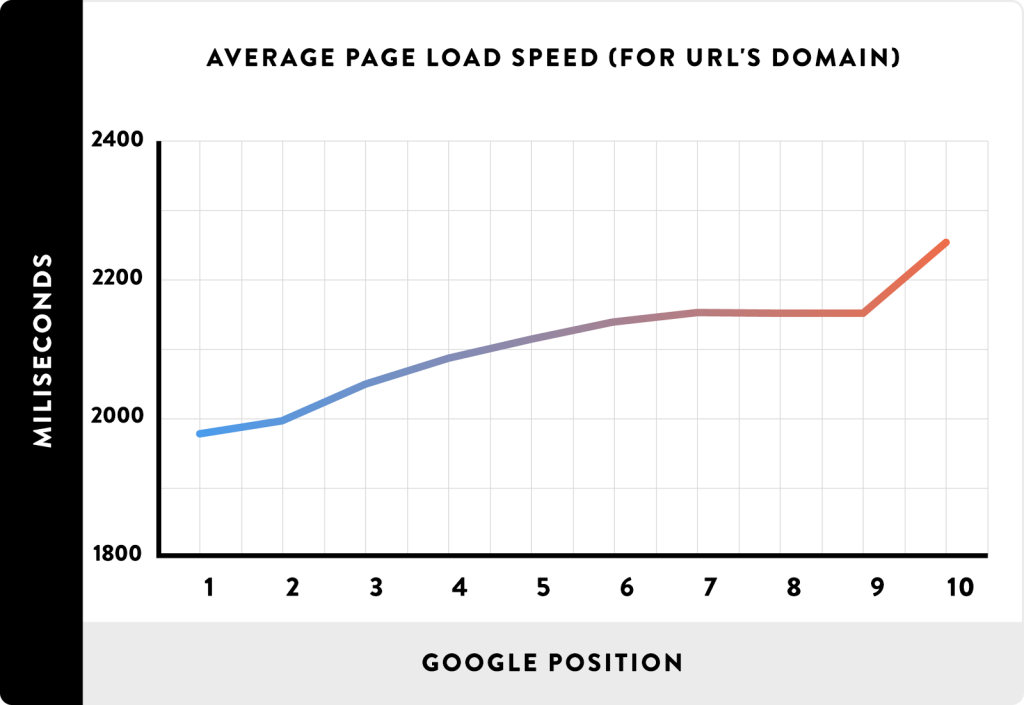
The top positions on Google all had the same thing in common:
- Fast page speeds on their websites.
- They had well-optimized sites that their creators had clearly designed for speed.
In addition, they found that the top-ranked sites also showed very low bounce rates compared with second- or third-page results:
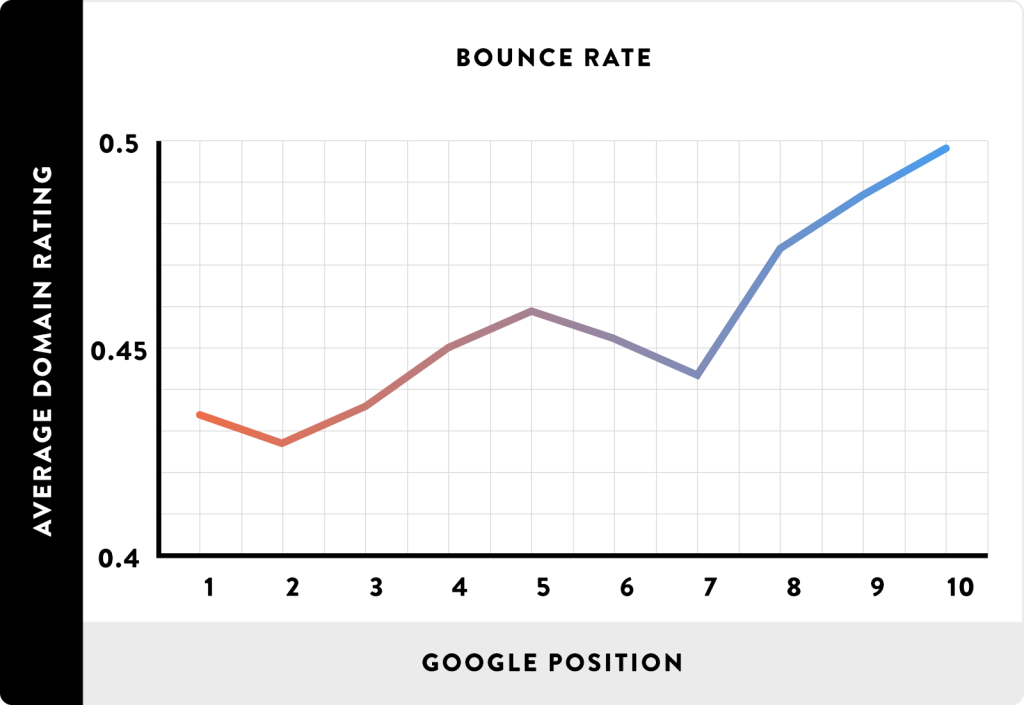
There was a strong correlation between fast websites and low bounce rates.
And this correlation was recently backed up and supported by Google’s new industry PageSpeed benchmarks.
They found that as page load time increased, the chances of someone bouncing from your website increased significantly depending on page load time:
- From 1 to 3 seconds: the probability of bounce increases by 32%
- From 1 to 5 seconds: the probability of bounce increases by 90%
- From 1 to 6 seconds: the probability of bounce increases by 106%
- From 1 to 12 seconds: the probability of bounce increases by 123%
This means that if your page takes 10 seconds to load, the probability that someone leaves your site before it even loads increases by more than 120%!
And if you look at the Backlinko chart above, it shows that the top-ranked websites on the first page of Google all had a page processing speed of under 3 seconds.
But according to Google’s latest report, most websites are incredibly slow across all industries:
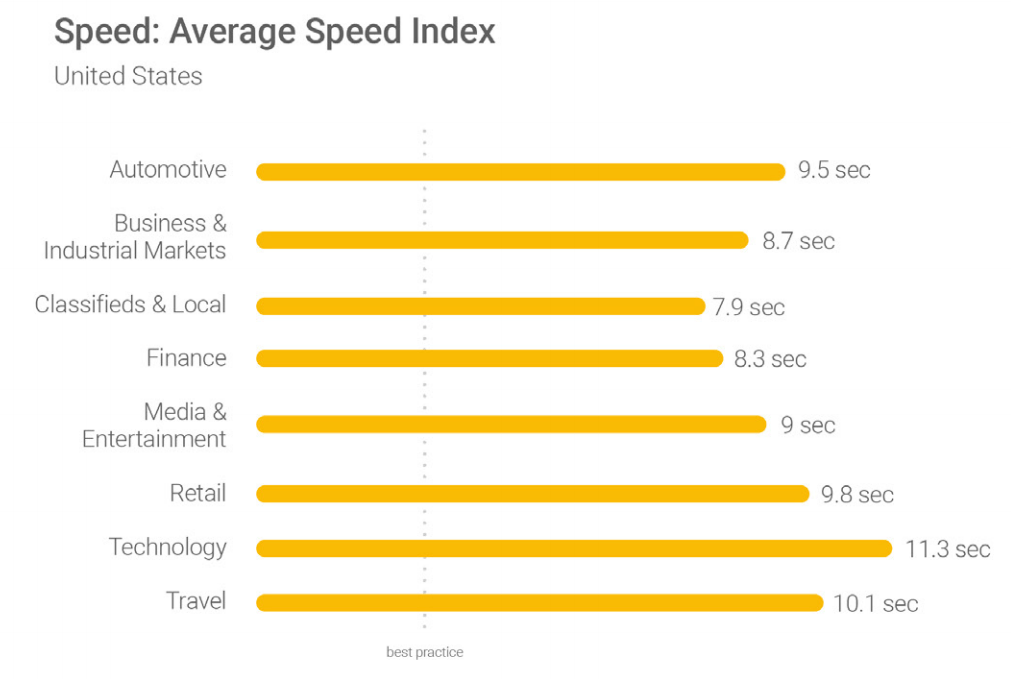
The average loading time of most sites is more than eight seconds and can even exceed 11 seconds in the technology sector.
Meanwhile, the best-practice benchmark is under three seconds.
Almost all of us are missing the mark when it comes to having a high-performing website.
If you want to have a shot at ranking on the first page of Google, your site needs to load in under three seconds.
The Backlinko study proved it, and Google’s benchmark data further reinforces the data.
In another study, BigCommerce revealed that e-commerce website conversion rates averaged around 1 to 2%.
And Portent used this study to carry out its own research. They found that when you speed up your site from two seconds to one second, your dollars per page view increase by 100%.
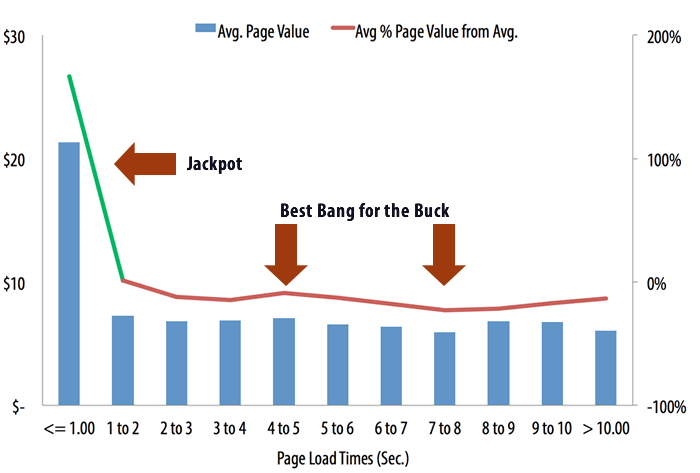
If you reach under two seconds of speed, your traffic and revenue will double.
So, what makes a page load slowly?
The most common causes of slow pages are large images and poorly designed coding.
If you look at any modern-era website, it is probably filled to the tipping point with images.
And if you don’t optimize your images, you could have pages that take up several megabytes of space.
Page size and weight are often measured in bytes. Simply put, page weights indicate the total size of a web page measured in bytes.
Google’s benchmark data indicate that the best practice for page size or weight is under 500 KB:
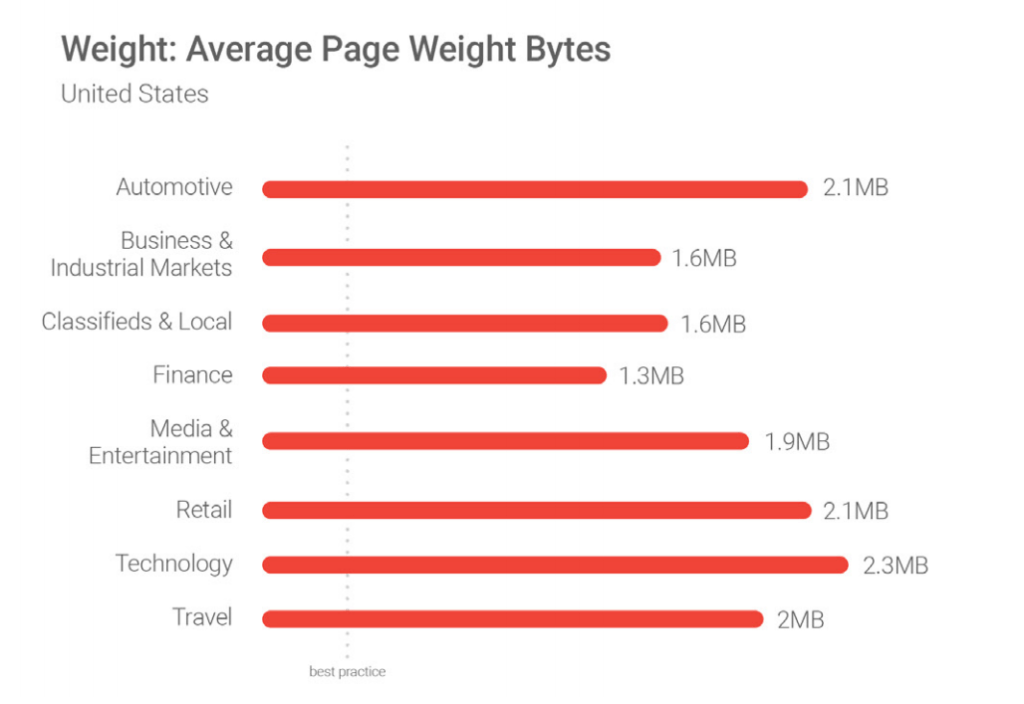
But again, most of us are missing the mark here. We far exceed the recommended weight.
One of the concepts that struck me the most in Google’s report comes from this short but powerful quote:
“No matter what happens, faster is better and less is more.”
With 70% of pages exceeding 1 MB, 36% more than 2 MB and 12% more than 4 MB, this statement carries a lot of weight (no pun intended).
Google found that a page weight of barely 1.49 MB (comparable to the average size of a single HD image) required seven seconds to load on a page.
In their research, they even found a web page containing images averaging 16 MB per image.
Google is simply telling us the hard but promising truth:
We have great room for improvement on our websites.
How to diagnose your site's speed on desktop and mobile
Knowing that slow websites kill conversions is only the beginning.
Recognizing that your site may have underlying problems that you can’t see on the surface is the first step.
Most sites will run slowly because of large images taking up too much space.
But that is not always the case for every website.
Before you can make the changes needed to get a score of 90 and above on the PageSpeed Insights, you need to know exactly what is making your site slow.
To start, open the PageSpeed Insights tool and enter your website’s URL in the bar:
To start, open the PageSpeed Insights tool and enter your website’s URL in the bar:
Click “Analyze” to have Google run a quick test on your site.
The final report will tell you everything you need to know about your site and what could be hurting its performance.
Here is what our report looked like as of November 3, 2019 on mobile:
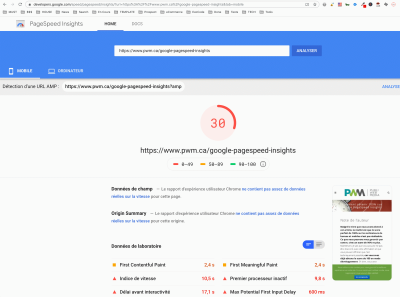
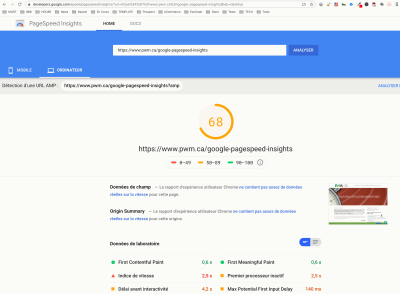
That’s a score of 30 out of 100 on mobile and 68 out of 100 on desktop.
That wasn’t really great. It was a poor result, in fact.
But there is almost always room for improvement. My goal here is to get you to 90 and above by the end of this article, as we take this page speed journey together.
Here are the 4 things to consider first:
1. Compress your images
Large images are the main cause of slow pages and low scores.
When I fixed this problem on my own site, I saw a huge impact on speed.
One of the best optimization techniques for fixing image size is compression.
You can save on average 50% or more on image size by using simple compression tools.
If you use WordPress, one of the best ways to do this without wasting time is to use a plugin.
2. Use browser caching
Browser caching is another tool that can have a major impact on page speed with relatively little effort.
Fetching the resources to load your website takes a lot of effort. It requires loading every image and every page element, then processing heavy HTML and coding.
Every time someone loads your site, this process has to be repeated. Your site will take too long to load.
And that is where browser caching can help.
It works by “remembering” previously loaded resources so that it doesn’t have to reload them on every visit.
When a website visitor goes to a new page on your site, all your data, such as logos and footers, no longer has to be loaded.
This will result in a sharp increase in speed when people land on your site.
So, how do you implement it? Fortunately, there is a plugin for that. To do this, you don’t need to be a coding expert.
3. Minify your HTML
Minimizing the space taken up by your HTML coding is another important factor in getting a perfect Google score.
Minification consists of removing or fixing unnecessary or duplicate data without affecting how a browser processes the HTML code.
This involves fixing the code, formatting, removing unused code and reducing the code where possible.
And again, thanks to WordPress’s great plugin options, you don’t need to be a coding genius to solve this problem.
4. Implement AMP
AMP is short for Accelerated Mobile Pages.
It is a project implemented by Google to help mobile pages load faster.
It works by creating an open-source format that strips out tons of unnecessary content, which lets your mobile pages load almost instantly.
It gives users a simpler mobile experience, without any cumbersome features that don’t work well on mobile devices.
If you browse the Internet on your mobile phone, you have probably clicked on an AMP-based article.
Here is what they look like:
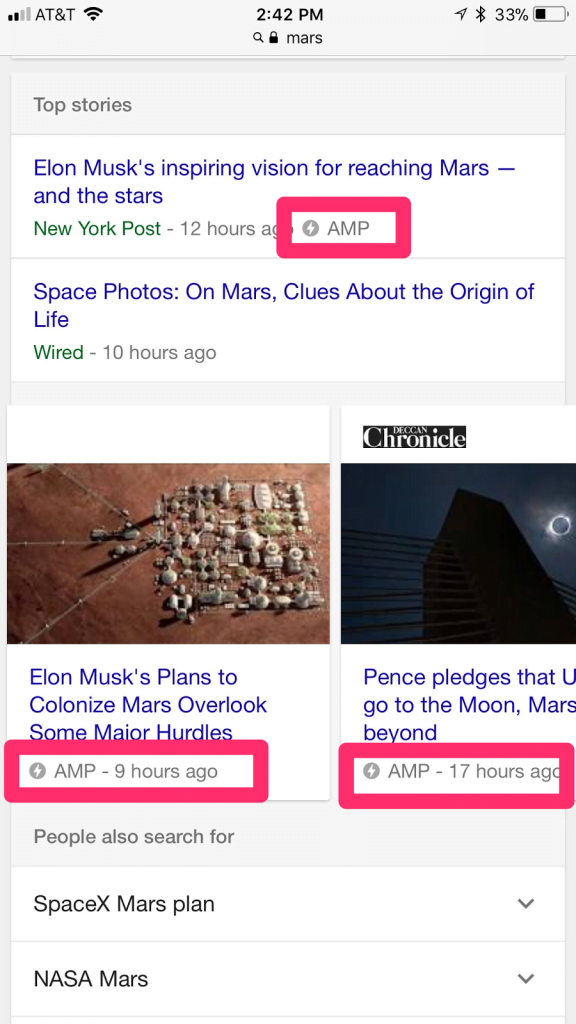
They are often relegated to the “Top Stories” section of Google search results and load instantly.
They don’t have much formatting, which helps them load quickly and deliver the content the mobile user wants to see.
When a Google user clicks one of these AMP articles, they see the content as follows:
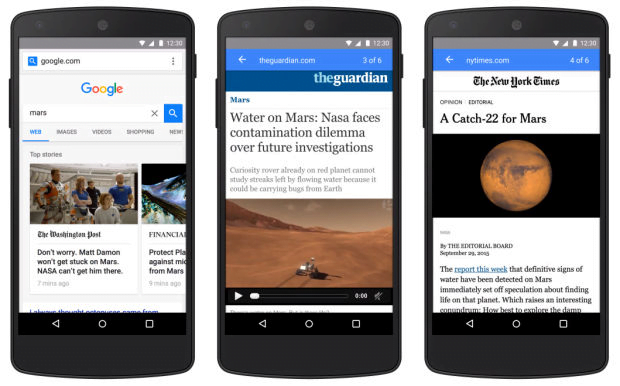
It’s a simplified version of the actual website that lets the user scroll through different stories without leaving the web page and by clicking on the next one.
For example, you can simply swipe left or right to read the next article in the sequence:
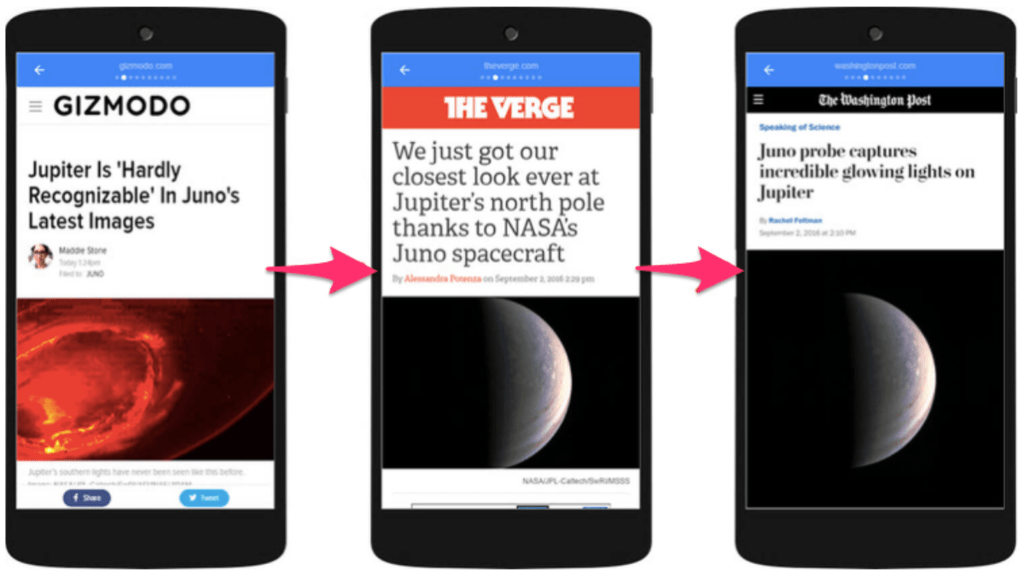
Google’s AMP Viewer, the Tinder UX for content
This feature streamlines the user experience on mobile.
Gone are the days when you had to wait 10 seconds for a site to load, then click Back to the search results page and wait another 10 seconds for the next site to load.
Here, you can access the content of several articles without clicking the Back button once.
It is extremely effective for speeding up your site and reducing the chances of visitors leaving.
Tons of companies benefit from AMP.
WIRED started implementing AMP to better reach its customers.

They found their mobile user experience was too slow. Conversions simply weren’t happening because of speed and visitor retention problems.
The decision to invest time in AMP had a considerable impact for WIRED.
They increased their click-through rate on organic search results by 25%.
They also saw a 63% increase in ad CTR in AMP stories.
They were also able to add AMP stories to more than 100,000 articles on their site.
Gizmodo also jumped on the AMP bandwagon and saw huge improvements on its mobile site.
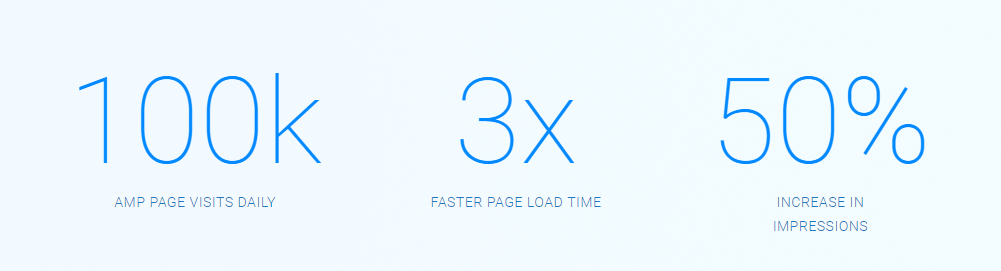
Every day, they received more than 100,000 AMP pages with loading times three times faster than standard mobile pages.
Conversions also increased by 50%.
It is safe to say that the AMP format can considerably increase conversions and mobile speed, giving you a huge opportunity to improve your performance on Google PageSpeed Insights.
If you want to start using AMP on your own site, you can do so in different ways.
If you know the HTML language, you can follow AMP’s detailed tutorial here.
For those who are less tech-savvy or have no HTML experience, try using a WordPress plugin.
If your site is built on WordPress, as ours is, one of the most popular plugins is AMP for WP.
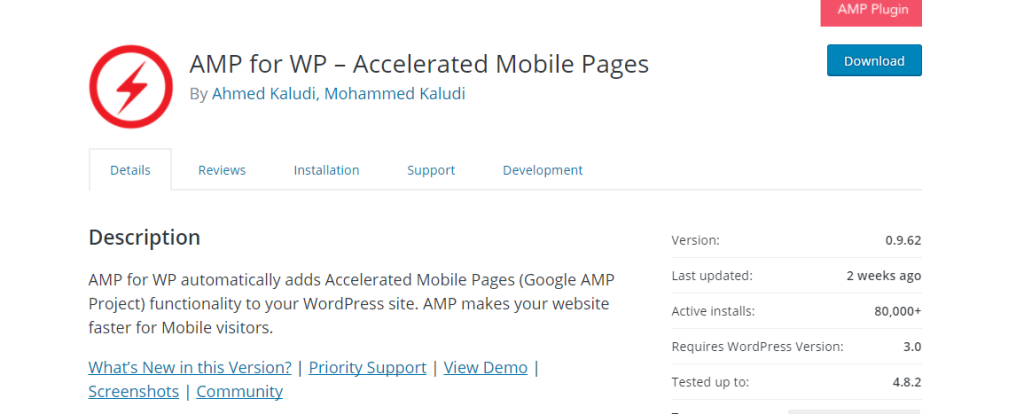
It has more than 80,000 active installations and benefits from constant support and updates.
The plugin includes an AMP page builder on which you can easily drag and drop page elements:
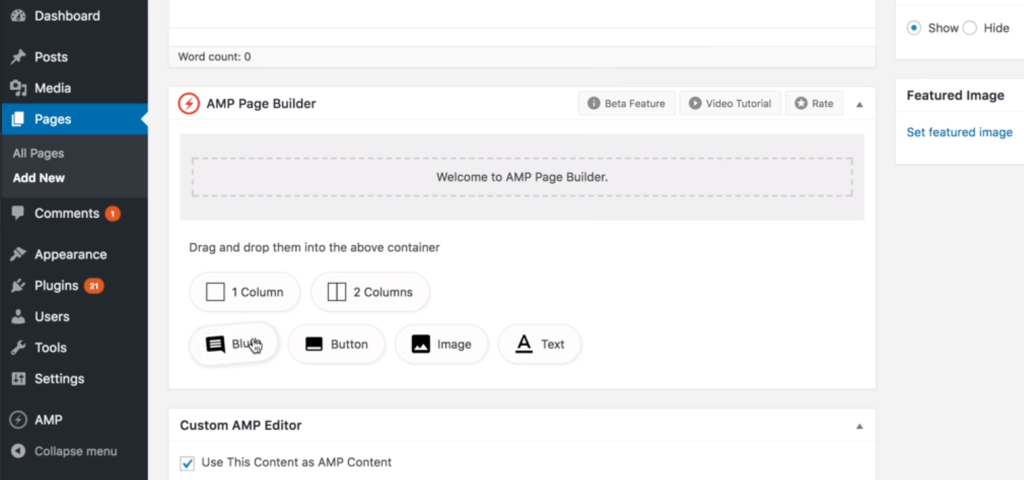
It is one of the easiest ways to create AMP-friendly content.
All you have to do is download and install the plugin on your WordPress dashboard and activate it.
From there, you can use the page builder for each new post you upload.
These pages will then create an AMP-friendly version that will appear in mobile search results.
AMP is a proven way to speed up your mobile site.
It can help you bring your speed to under a second, and tons of companies are achieving it.
Conclusion
When you have spent countless days, weeks and months creating a new website, you want it to be perfect.
Every image, element and icon must be top-notch.
But this often leaves you with a website that is slower than the best practices set by Google.
And when it comes to generating conversions on your site, speed will always play an important role.
Internet users don’t want to wait 10 seconds for your site to load when they can go back to Google and select the next result.
And Google’s main aim is to deliver a good user experience. So if your site is too slow and Google sees people bouncing, it will drop you in the SERPs.
It is essential that you get a score of 90 to 100 on Google’s PageSpeed Insights. Or as close as possible to that perfect score.
This should be one of your priorities when you are trying to perfect and optimize your site.
To get started, you must first diagnose the problems afflicting your site.
Is it images, page elements, too much text, poor coding or all of the above?
Use the Google PageSpeed Insights tool to determine your next steps.
Generally, images will make up the bulk of your work.
Start by compressing and optimizing your images with a plugin or website image compressor.
Next, use a plugin to leverage browser caching. You can find plugins that help your site load much faster and use fewer server requests.
Then, consider minifying your coding. This step will help you remove any unnecessary code that slows your site down.
Finally, try implementing AMP so your pages load instantly.
These are proven tools that have had a major impact on many companies’ sites.
Getting from 90 to 100 on Google PageSpeed Insights can give your website the boost it needs to succeed.
What are the best ways you have found to increase your site’s speed?